
The 90-Day Churn Wall: Why Patients Quit Your App and How Behavioral Design Keeps Them
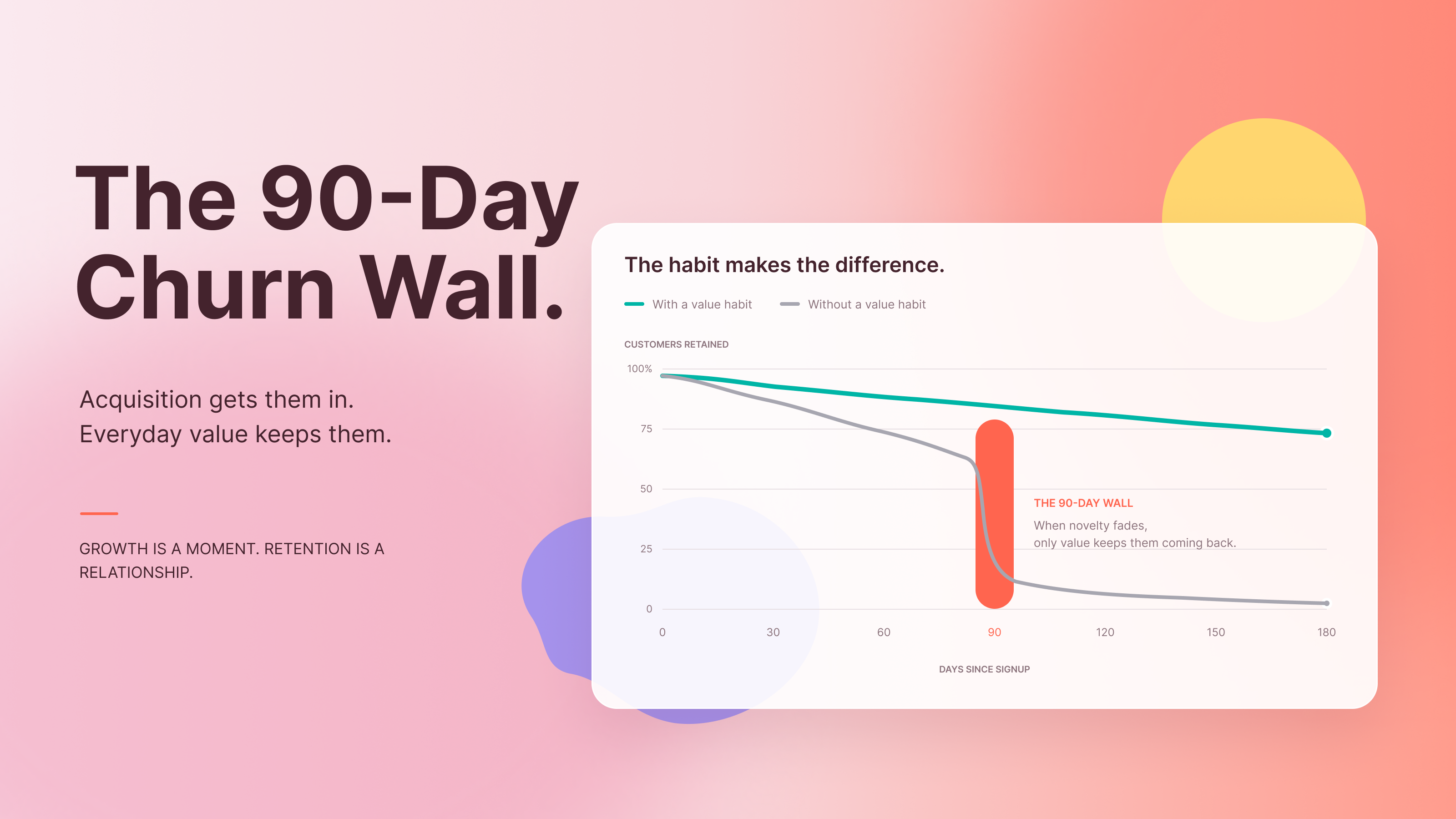
Industry reporting on mobile health apps repeatedly shows the same curve: a steep fall in active users within the first weeks, and a thin remainder by the end of the first quarter. Treat any exact figure you read with suspicion, including the often-quoted claim that up to 80 percent leave within 90 days, because definitions of “active” vary. Your own cohort data is the only number that matters. For most B2C digital health products, it looks bad.
The usual diagnosis is wrong. Patients do not lose motivation. Your product spends it for them.
The Day-7 Drop-Off: Why Motivation Alone Can’t Save Your App
A newly diagnosed patient downloads your app on the evening she hears the news. Her motivation peaks right there, in the parking lot or on the sofa. It will never be higher.
Behavioral scientists call the distance between what people intend and what they do the intention-action gap. It exists in every domain, and chronic illness widens it. Fatigue, pain, medication side effects, caregiving duties, and plain fear all drain the same cognitive budget the app needs her to spend. Motivation is a depreciating asset. Ability and cue timing are the variables a product team controls.
Here is the mechanism. Each task in your app has a cognitive friction threshold, the point where the effort required exceeds what a person can spare right now. On day one, with high motivation, her threshold is generous. By day seven, after a bad night’s sleep and a pharmacy delay, it has collapsed. A task that felt trivial on Monday feels like a chore on Sunday. She does not decide to quit. She skips one session, then a second, and the habit never forms.
Enthusiasm cannot cover that gap. Only a lower effort floor can.
3 Mechanical Product Flaws Driving Patient Churn
Flaw 1: Front-Loading the Cognitive Tax
Many onboarding flows behave like intake paperwork: name, date of birth, full medication list, history, goals, baselines, device pairing, permissions. Eleven screens before the first useful moment.
Each screen is a tax collected at the point of maximum fragility and minimum payoff. The patient has received nothing yet, so every question feels like a cost with no return. Designers call this a poor effort-to-reward ratio, and it is the most common cause of first-session abandonment.
Founders defend long onboarding with a reasonable argument: personalization needs data. True, but it does not need all of it immediately. Most fields feed features the patient will not touch for days. Collecting them upfront buys the product convenience and charges the patient for it.
Flaw 2: The Data Vomit Dashboard
A glucose curve, a heart-rate stream, sleep stages, a composite score, and a column of lab values with reference ranges. The dashboard displays everything the sensors captured and interprets nothing.
Raw data transfers the analytic work to the user. A patient with low numeracy, or one who is simply exhausted, cannot convert a line chart into a decision. Worse, unexplained numbers produce anxiety. A reading flagged in red without context can trigger worry, a late-night search, and a deleted app.
The failure is a lack of health literacy alignment: the product speaks the language of its data scientists instead of the patient. A dashboard answers “what was measured.” Patients ask “am I okay, and what should I do next.”
Flaw 3: Alert Over-Saturation
Push notifications are the cheapest retention tool a team can buy, so teams overuse them. “Don’t forget to log your meal!” at the same time every day, regardless of whether she logged breakfast, slept badly, or is in the hospital.
Generic reminders convert a medical companion into a nag. Patients respond the way people respond to any nuisance: they mute, then disable, then uninstall. Once notification permission is revoked, you lose your primary re-entry channel for good, and on iOS you cannot ask again with the system prompt.
Volume is only half the problem. Tone matters. Reminders that imply failure (“You missed yesterday”) trigger shame, which suppresses return in the very patients who need the product most.
The Behavioral Retention Framework
Three engineering changes target the flaws above. None requires a rebuild. All require discipline about what the product asks, and when.
Solution A: Build a Progressive Disclosure Pipeline
Replace the onboarding form with a staged pipeline spread across the first two weeks.
- Minute one: Ask for the minimum that enables one useful action. Often that is a single goal or condition. Deliver value inside the first session.
- Days two to four: Introduce one feature per session, each gated by the patient’s own demonstrated readiness, not a fixed calendar.
- Days five to fourteen: Request richer data, such as medication lists or device pairing, at the moment a feature needs it, with a sentence explaining the benefit.
Make every deferred question skippable and re-askable. Log which prompts patients skip, and treat the skip rate as a measure of friction. A question skipped by most users is a question your product does not need yet.
Solution B: Deploy Contextual Micro-Interactions
Momentum matters more than milestones. Patients who feel early progress return. Patients who feel early labor do not.
Design micro-reward structures that confirm effort within seconds and tie directly to the patient’s condition. Examples:
- After a blood pressure entry, show an instant plain-language reading: “In your target range. Same as last Tuesday.”
- After a completed exercise, display a concrete note of what changed: “Your walking time rose four minutes this week.”
- After a missed day, offer a one-tap restart with no penalty and no guilt.
These work as dopaminergic feedback loops in the practical sense: a small, accurate, variable signal of progress that makes the next action feel worthwhile. Keep them honest. Rewards unconnected to a real health outcome feel patronizing, and variable feedback must reflect true variation in the data, not random confetti.
Avoid streak mechanics that erase progress after one missed day. For a patient in a flare or a depressive episode, a broken streak reads as failure and gives her a reason to leave.
Solution C: Cultivate Asymmetric Trust
Patients give your product far more than it gives back: symptoms, medications, moods, location. That imbalance, which we can call asymmetric trust, means the burden of proof sits entirely on you.
Build proof into the interface instead of the legal footer:
- Show, in plain words and simple visuals, what is collected and who can see it.
- Ask for each permission at the moment of use, with the benefit stated in one line.
- Offer a single privacy screen where patients can review, export, and delete their data, with withdrawal as easy as opt-in.
- Display security assurances only where they are true, and link each to a short explanation.
Trust is also a retention variable. A patient who understands what happens to her data uses the product more openly, and open use produces better data and better outcomes.
Designing for Low Digital Health Literacy
Your median user is not your design team. Many patients are older, sick, anxious, or unfamiliar with apps, and some read below the level your copy assumes.
Build for them deliberately.
- Write plainly. Aim for a reading level near grade six to eight, explain medical terms where they appear, and replace abbreviations with words.
- One task per screen. Each screen asks one question or presents one action, with a single dominant button.
- Type and targets. Use large, high-contrast text and generous touch areas. Respect system font scaling.
- Interpretation first. Lead every number with its meaning (“Higher than usual”), then offer the value.
- Support human help. Place a visible route to a phone number, a chat, or a care team member on every key screen.
- Allow caregivers. Provide delegated access so a family member can help with setup and tracking, with the patient’s explicit permission.
- Test with real users. Run sessions with older and low-literacy patients, and watch where they hesitate. Hesitation is a measurable signal that something is wrong.
Accessible design does not narrow your market. It widens it, and it lowers support costs in the process.
Audit Your Activation Drop Before the Next Cohort Lands
Open your funnel data today. Find the screen where the largest share of new users disappear in session one. Count the fields between install and the first useful moment. Compare notification opt-out rates against the number of messages sent in the first two weeks. Check what percentage of day-7 users have ever opened the dashboard.
Then fix the single largest drop first.
Your churn wall was not built by your patients. It was built by your onboarding, your dashboard, and your notification schedule. Each can be rebuilt. If you want to find where your cohort leaves, start with the activation curve and work backward.