
De-Risking the EHR: Minimizing Clinician Cognitive Load in High-Stress Environments
Your ICU Module Is Accurate. It Is Also Unusable at 3 a.m.
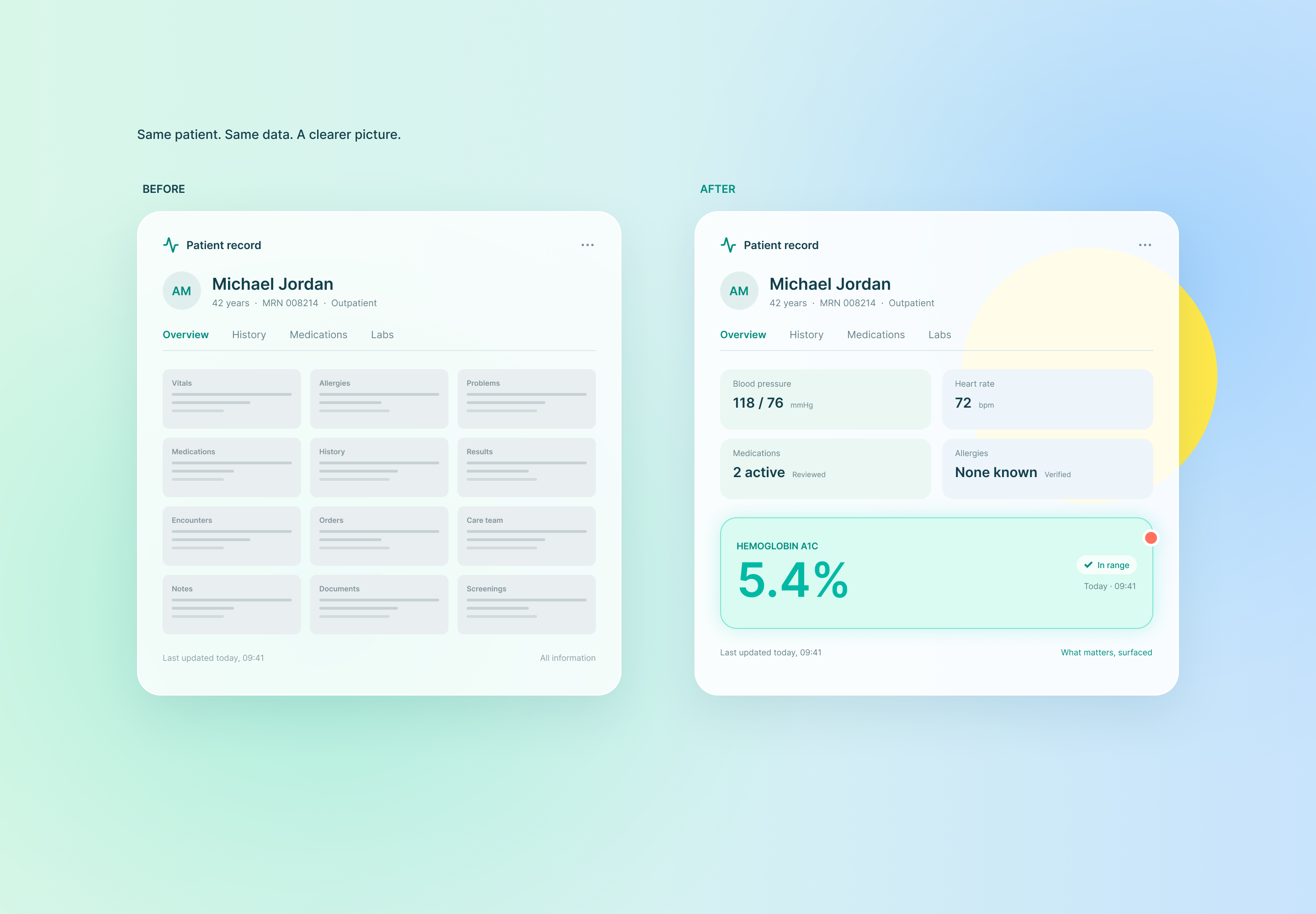
No hospital tells a vendor its ICU pilot failed because the interface was dangerous. The feedback is vaguer: “Nurses aren’t really using it.” Behind that sentence sits a clinician who needed a lactate trend during a septic shock resuscitation, couldn’t find it in under ten seconds, and went back to the bedside monitor and a sticky note.
Your data model may be flawless. In the ICU, a correct number that takes too long to find is functionally the same as a wrong one.
The Chasm Between the Pitch and the Bedside
Your demo patient had a tidy chart: six vitals, two labs, one alert. The presenter knew exactly where to point.
A real ICU patient on three vasoactive infusions, a ventilator, continuous renal replacement therapy, and sedation holds generates hundreds of data points per hour. The nurse watching that patient is also managing a second patient, answering a family member, and ignoring the fifth alarm of the hour. Your product enters as another surface demanding interpretation.
This is where EHR de-risking becomes a product requirement instead of a design preference. De-risking means treating every second of search time and every ambiguous input field as a hazard you introduced, and then removing it before the clinician pays for it. Hospital safety committees already evaluate infusion pumps and ventilators this way. They are starting to apply the same scrutiny to software.
The pilot death spiral in the ICU runs fast:
- Clinicians hit intrapilot clinical friction in the first shifts and fall back to old workarounds.
- Workarounds mean incomplete usage data, so your outcome metrics look flat.
- The nurse manager, who has staffing problems and no appetite for another one, stops endorsing the tool.
- The CMIO sees low adoption, no measurable benefit, and a risk register entry. The pilot ends.
Clinical accuracy appears nowhere in that sequence.
The 3 Fatal Design Flaws Killing ICU Pilots
Flaw 1: A Flat Visual Hierarchy
Under acute stress, clinicians stop reading and start scanning. The eye lands top-left, follows the strongest contrast, and snaps to color or motion. Your interface either exploits that pattern or fights it.
Most early-stage products fight it. Every metric gets the same type weight, the same card size, the same spacing. The mean arterial pressure that drives the next titration looks identical to the time of last dressing change. The clinician must read everything to find anything, which is the opposite of scanning.
Color is the second failure. When red marks a critical potassium, an overdue task, a decorative header, and a brand accent, red stops carrying information. Clinicians learn, correctly, to treat it as wallpaper. Then a genuine life-threatening flag arrives in the same color and gets the same glance.
Pair that with low-contrast gray text that looks refined on a designer’s calibrated monitor and turns illegible under night-shift fluorescents. The product technically displays the data. The clinician cannot extract it.
Flaw 2: Density Without Hierarchy, Plus the Context-Switching Tax
Founders ship every insight the model produces because each one feels like proof of value. Risk scores, contributing factors, trend lines, confidence intervals, and secondary flags all land in the primary view. The result is a poor information density hierarchy: no signal of what needs action now versus what can wait for rounds.
Then the alerts arrive. ICUs already operate under severe EHR alert fatigue, and clinicians override most of what fires at them because most of it carries little value. Every low-precision alert you add trains the unit to ignore the next one, including the rare one that matters. A model with strong sensitivity and mediocre positive predictive value can teach a whole nursing staff to dismiss it within weeks.
Density has a sibling problem. If your product lives in its own tab, you impose a context-switching penalty on every use: a new login, a patient re-search, and a mental reconstruction of where the clinician was in her thinking. Working memory is the scarcest resource in the unit, and a fatigued clinician holds fewer items than a rested one. Making her carry a lab value across two screens is a design failure, not a user failure.
Clinical cognitive load limits are fixed. You decide how much of that capacity your product consumes.
Flaw 3: Input Patterns That Invite Error
Fatigue degrades arithmetic first, and it does so silently. Yet many MVPs hand clinicians free-text dose fields, unlabeled units, and confirmation dialogs that restate the order in identical words.
That last pattern deserves attention. A clinician who has decided on a dose treats the confirmation screen as proof of the decision rather than a check on it. Confirmation bias turns the dialog into a rubber stamp. The same wording and the same format produce the same reading, and the error passes through intact.
Other common failures:
- Unit ambiguity. A number in a field with the unit only in a distant label.
- Display ambiguity. Trailing zeros and bare leading decimals that invite tenfold misreads.
- Stale inputs. A dosing calculation using a weight that was last verified days ago, with no visible warning.
- Uniform alerts. Every interaction warning has the same dismissible modal, so the dangerous one looks like the forty trivial ones.
The Pilot-Saving UX Blueprint
You can implement three changes before your next pilot begins.
1. Rebuild the hierarchy around the decision, not the data
Rank every element by the question the clinician is asking in a crisis. Give the values that drive immediate action, such as MAP, vasopressor rates, oxygen saturation, and the latest lactate, the largest and heaviest type on screen. Demote history and administrative metadata to smaller, lighter styles.
Ration color with discipline. Red means life-threatening and act-now, with no exceptions and no decorative use. Amber means attention within the hour. Everything else stays neutral. Pair every color with a second cue, whether an icon, label, or position, because color vision deficiency affects a meaningful share of clinicians and dim lighting degrades color discrimination for everyone. Keep the same data in the same screen location for every patient so muscle memory replaces conscious search, and resist unit-level layout customization that fragments the scan path for float-pool nurses.
2. Declutter with progressive disclosure and EHR-native embedding
Adopt a three-tier model for everything your product surfaces:
- Tier 1: Requires action now. Interruptive, rare, visually dominant.
- Tier 2: Requires attention this shift. Passive, visible in the primary view.
- Tier 3: Context for later. Behind a tap or expansion.
A lactate tile should show the latest value, its direction of change, and the draw time. One tap opens the full trend with reference ranges. The detail exists but doesn’t compete until summoned. Set an explicit alert budget per clinician per shift and tune thresholds to stay inside it, even at some cost to sensitivity. Pair each Tier 1 alert with one pre-populated next action so the clinician reaches the outcome in a single tap.
Eliminate the context-switching penalty by launching inside the chart through SMART on FHIR with patient context passed through and single sign-on in place. Offload memory to the interface: show the previous value beside the new one, the weight used in a calculation, and the time since the last antibiotic dose.
3. Engineer error out of the input layer
Decide between hard stops and soft stops drug by drug. A hard stop blocks outright and suits cases with no plausible legitimate override, such as a tenfold error on a high-alert medication. A soft stop warns and permits override where clinical judgment may legitimately diverge. Overuse soft stops and override becomes reflex.
Then shift the work from the clinician to the system:
- Default to the standard concentration and unit for the selected drug, and require a deliberate step to deviate.
- Constrain numeric fields to plausible ranges and display units inside the field itself.
- Auto-calculate weight-based doses from a verified, visible weight, and flag staleness.
- Rewrite confirmations in a different frame from the entry: dose per kilogram beside total dose, concentration beside rate, and a plain-language flag such as “10 times the usual starting dose” when a value falls far outside expected range.
Each pattern removes a place where a slipped digit can travel unchallenged into a bag of medication.
The Ultimate Metric: Time-to-Value (TTV)
Nurse managers do not sustain pilots on goodwill, and CMIOs need evidence they can defend to a safety committee. The strongest evidence is time returned to the clinician and errors that never happened.
Define time-to-value as the elapsed time from a clinician opening your product to completing a task with a clinically useful outcome. Measure time-to-task efficiency against the current workflow, including the workaround, not against an idealized empty state.
Instrument your pilot from day one:
- Time-to-critical-data: Median seconds from launch to locating a defined key value, such as the latest lactate trend, compared with a timed baseline.
- Input error rate: Entry corrections, near-misses caught by guardrails, and out-of-range entries per hundred orders, tracked by build.
- Alert acceptance and override rates: The share of Tier 1 alerts that produce a clinical action. A falling acceptance rate is your earliest fatigue signal.
- Click and screen count: Steps to completion for each core workflow.
- Week-three return use: Whether clinicians come back unprompted.
- Net minutes per patient: Time your product removes minus time it adds, reported plainly.
Run these under simulated stress, with interruptions and a clinician at hour ten of a shift, not a rested volunteer in a quiet room. A CIO who sees a modest but verified gain in time-to-critical-data across a unit’s daily census can do the multiplication, and that arithmetic converts a pilot into a contract. A negative number is cheaper to find in week two than in month six.
Audit Your Pilot Before the Safety Committee Does
Pull your deployment data this week. Count the clicks between launch and the first critical value. Check how many alerts reached each ICU nurse per shift and how many triggered a response. Compare week-one logins with week-three logins. Review every override and every corrected entry as a safety signal rather than a log line.
If any of those numbers surprise you, the pilot is already in the spiral. Fix the workflow fit while your clinical champion is still answering emails.